Turn your know-how into step-by-step instructions your team will use


If one person is off sick and a job stops, that job lives only in their head. By the end of this guide, it is a tested, one-page instruction (an SOP, short for standard operating procedure) that a colleague can follow without phoning anyone.
You do the job once while a tool records it, or talk it through. AI writes the steps. A colleague tests them. About an hour in total, spread over a few days.
What you need
- An AI assistant on a business account: Claude, ChatGPT, Microsoft 365 Copilot or Gemini. What you can paste into it is in our guide on AI and the Data Protection Act.
- One way to capture the job, depending on where it happens:
| The job happens… | Capture it with | Cost |
|---|---|---|
| On screen, in a web browser (entering a supplier, booking holidays) | Scribe: records your clicks and makes a step with a screenshot for each one (our review) | Free plan |
| Away from a screen, or the “why” matters (opening the shop, a site visit, a machine set-up, a phone call) | Loom on your phone: films you doing it while you explain (our article) | Business + AI plan, 14-day free trial |
| Either, with no extra tool | The microphone in your AI app: talk the job through and the app types it | CHF 0 |
- A shared folder for finished SOPs, for example “How we work” in SharePoint or Google Drive.
- One colleague for a 15-minute test.
- Skills: no technical skills needed.
The steps
Step 1: Let AI help you pick the first job (5 minutes)
Paste this into your AI assistant:
I run a [12-person electrical installation firm in St. Gallen]. Here are the jobs my team does: [list them as they come to mind, one line each]. Pick the three that most need a written instruction, using these tests: new staff ask about it in their first month; only one person knows how to do it; it happens weekly or monthly, so people forget the details; mistakes cost money or annoy customers. For each, say in one line why.
Pick the one that would cause the most trouble if the person who knows it were away for two weeks. Start with a job that takes under 30 minutes.
Step 2: Capture the job once (15 minutes)
Screen job: use Scribe.
-
Install Scribe from the Chrome Web Store or Microsoft Edge Add-ons. Search for “Scribe” and click Add to Chrome (Scribe help).
What you’ll see: the Scribe icon in your browser toolbar.
-
Click the Scribe icon and choose Start capture.
-
Do the job once, at normal speed.
What you’ll see: each click appears as a step in a side panel Scribe calls “Sidekick”.
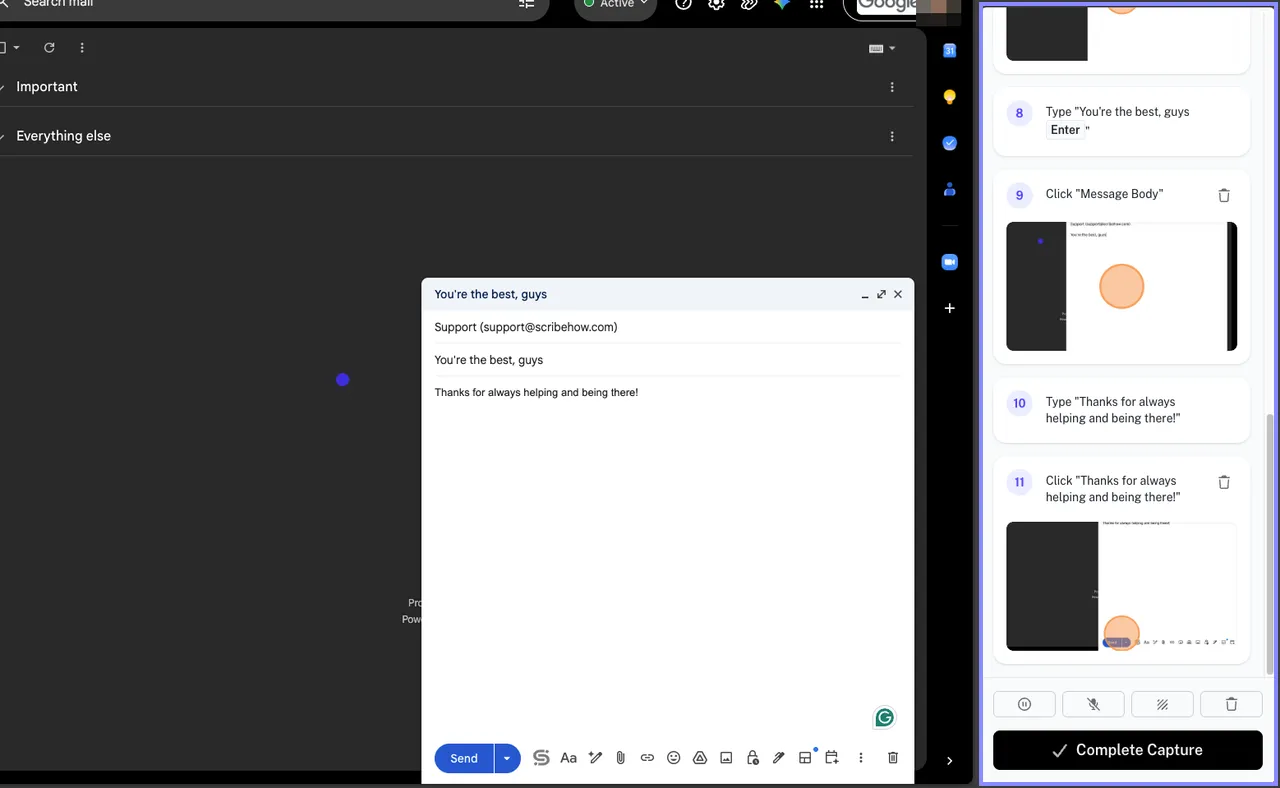
The Sidekick panel on the right adds a numbered step with a screenshot for each click, and Complete Capture ends the recording. Scribe’s example captures an email, not a supplier form. Screenshot: Scribe help centre, cropped and highlighted by BizzyAI.
-
Click Complete Capture.
What you’ll see: a draft guide with a screenshot for each step, which you can edit before you share it.
Close tabs with customer data first and use a test customer. The screenshots show everything on your screen.
Physical or spoken job: use Loom on your phone. Open the Loom app, choose the camera, and film yourself doing the job while you explain each step and the “watch out for” bits (“the back door sticks, push it twice”). Then open the video on a computer and let Loom AI write the SOP. The full steps are in our Loom article.
No extra tool: open the ChatGPT, Claude, Copilot or Gemini app on your phone, tap the microphone in the message box and talk the job through as if training someone next to you. Rough sentences are fine.
Prefer to be asked questions? Install our handover interviewer skill in Claude or ChatGPT and type “Interview me about [job]”. It asks one question at a time.
Step 3: Let the AI write the SOP (5 minutes)
-
Open your AI assistant in a new chat.
-
Paste the SOP prompt from the copy-paste box below and fill in the [square brackets].
-
Paste your notes, the transcript, the Scribe text or the Loom draft at the end, and send it.
What you’ll see: Purpose, When to do it, What you need, numbered Steps, What can go wrong, Done when, and a list of questions about gaps.
-
Answer the AI’s questions in the same chat. It spots the steps you skip because you’ve done them a hundred times.
Shortcut: with our SOP writer skill installed in Claude or ChatGPT, type “Write an SOP for [job]” and paste your notes. The rules below are built in. To make the skill fit your business, tell it what you didn’t like about the first draft, paste a good SOP you already have, and ask it to update the skill (Customise a skill).
Step 4: Check it (10 minutes)
- In the same chat, send: “Read this SOP as a new employee. List every step where you would not know what to do.”
- Fix those gaps with one more answer.
- Read the result once yourself and delete anything you didn’t say. AI fills gaps with guesses that sound right, most often menu and button names. Compare each button name with the real screen.
- Check that no real customer names, phone numbers or account numbers are left in the text or screenshots.
Step 5: Have a colleague test it (15 minutes)
Give the SOP to someone who has never done the job, or rarely does it. Ask them to follow it without asking you anything. Sit nearby, say nothing and note every place they hesitate. Each hesitation is a missing step. Tell the AI “Add this step after step 4: …” and it renumbers the rest.
Step 6: Publish it where people will find it (5 minutes)
- Ask the AI: “Format this as a one-page document with the owner [name] and a review date six months from today at the top. Give it to me as a Word file.” Save the file in your “How we work” folder, or open it in Google Docs if your team works there. For a Scribe or Loom guide, share its link instead.
- Name it the way people search, for example “SOP - Quotes - Sending a quote”.
- Pin the link where the job starts: the month-end calendar entry, the team chat, the shared mailbox.
Step 7: Translate it if your team needs it (2 minutes)
Ask: “Translate this SOP into Swiss French. Keep the step numbers and the bold button names exactly as they appear in the software.” Ask a native speaker to read it once.
Copy-paste box: the SOP prompt
You are helping me write a step-by-step instruction (SOP) for my business.
Business: [type of business, number of staff, town] Job: [name of the job, e.g. “Sending a quote to a new customer”] Who will use it: [role and experience, e.g. “a new office assistant in their first month”] Software involved: [names of the tools, and the language their menus are in]
Turn my notes below into an SOP with these sections: Purpose (one sentence), When to do it, What you need, Steps, What can go wrong, Done when.
Rules:
- Numbered steps, one action per step. If the screen changes, that is a new step.
- Use the exact button and menu names from my notes, in bold. Don’t translate them.
- After steps where it helps, add what the person should see (“A green tick appears”).
- Put decisions as “If [situation], then [action]”.
- Plain language, short sentences, address the reader as “you”.
- Don’t add steps, facts, prices or rules that aren’t in my notes. List your questions at the end under “Questions for the owner”.
- Replace personal data (names, phone numbers, account numbers) with [placeholders].
- If the job has safety steps, put them first and mark them “Safety”.
- Write in [English / German / French / Italian]. Swiss spelling: “ss”, never “ß”.
My notes: [paste notes, transcript, Scribe text or Loom draft]
What can go wrong
- The SOP shows how the job should be done, not how it is done. The colleague test in step 5 catches this.
- The AI invents menu names. Step 4 catches this. Rule 6 in the prompt keeps it rare.
- Nobody uses it. Put the link where the job starts (step 6), and use the SOP to train the next new starter.
- It goes out of date. When the software changes, the owner updates it. The review date is the reminder.
Do this week
- Monday, 5 minutes: let AI pick your first job (step 1).
- Tuesday, 15 minutes: capture it with Scribe, Loom or your phone’s microphone (step 2).
- Wednesday, 15 minutes: let the AI write it and check it (steps 3 and 4).
- Thursday, 15 minutes: have a colleague test it (step 5).
- Friday, 5 minutes: save it, pin the link and tell the team (step 6).
Once you have five or six SOPs, our new starter training plan turns them into a new hire’s first two weeks.
For Swiss businesses
- Use SOPs for safety instruction. New employees have a 50% higher accident risk in their first six months. Swiss law (Art. 6 of the accident prevention ordinance, VUV) requires employers to instruct new staff when they start, and Suva, the Swiss accident insurer, recommends keeping a record of each instruction (Suva). Put the safety steps first in each SOP (rule 8 in the prompt), have new staff sign and date it after their first instruction, and keep that page in their file.
- Write an SOP for a data leak. Under the Swiss Data Protection Act, you must report a data security breach to the Federal Data Protection and Information Commissioner (FDPIC) as soon as possible if it is likely to cause a high risk for the people affected. You report it through the FDPIC’s online portal, and your IT and software providers must tell you about every breach (FDPIC guide, FDPIC reporting portals). Ask the AI: “Write a one-page SOP for a data leak in a [12-person] Swiss business: who decides, who reports to the FDPIC, who informs customers.” Then check it against the FDPIC guide.
- A Swiss-hosted AI for internal know-how. Euria, from Infomaniak in Geneva, runs only in Infomaniak’s Swiss data centres and doesn’t train on your data. Basic use is free; business use comes with kSuite Pro (Infomaniak). The SOP prompt works there too.
- One SOP, three languages. Write it once in the language you know best and let the AI translate it (step 7). Scribe’s own translation is only on its Enterprise plan (Scribe help); your AI assistant does it at no extra cost.
Keep it legal
Under the Swiss Data Protection Act (nDSG), only paste personal data into AI tools your business has approved for it, and keep real customer details out of SOPs, screenshots and videos. Scribe stores data in the US, under a data processing agreement with standard contract clauses and Swiss-specific terms (Scribe DPA). Loom lets you keep data in Frankfurt if you choose it when you create the workspace (Atlassian Support).
What it’s worth
For example, take a 15-person installation firm in St. Gallen. If the office manager answers “how do I do X again?” five times a week at 10 minutes each, that is over 40 hours a year. Five SOPs behind those questions give most of that time back, and the jobs keep running when someone is off sick or leaves.
Legal note: This article is general information, not legal advice. Laws change and every business is different, so always get advice from a qualified lawyer or your fiduciary (Treuhänder) before you act on it.
Get the free newsletter
Every Friday: three AI stories that matter for Swiss businesses, and what to do about them. Free, in English, German, French or Italian.